0 Items
$0.00
   
 
Mailing List
Specials

Instructions for Snap Press

 Please watch or read the instructions in their entirety and practice on scrap fabric before using your press! 

   The instructions apply to both the DK-93 and the DK-98 KAM presses.


Written Instructions

Attaching the Handle:

Insert the base of the handle between the two walls of the top of the press, making sure to align the holes.


Slide the screw through the holes.


Firmly tighten the nut on the end of the screw.


Using the Press:


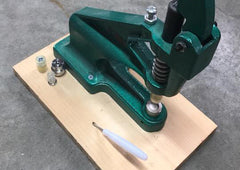
This is how each of the snap components are attached to the dies. 


The large cap die sits at the bottom of the press.


The socket and stud dies are attached to the top of the press.  Note that the DK-93 model has screw-in shanks, as shown, while the DK-98 has smooth shanks which will require the smallest allen wrench to tighten. If you have the DK-98, do not overtighten the screw.  Just tighten it enough to keep it secure.


We start with the stud die.


Lay the cap upside down, with the prong facing upward, on the cap die.


Attach the stud, with the mouth facing upward, to the stud die.


Press the prong of the cap through your fabric.  Using an awl to first poke a hole in your fabric may make this easier. 


Press the handle down hard.


When you release the handle, your fabric will be stuck to the top die. 


Detach the fabric from the die.


Remove the stud die from the top and replace with the socket die.  Follow the exact same directions to attach the socket.

Note that the prong should be fairly flattened.  If it is not, it will get in the way when you try to close the 2 sides of the snap so that they will not fasten securely.

In the picture below, the prong on the right has not been flattened sufficiently so it sticks up more.  When this happens, the protruding prong will get in the way when you try to close the 2 ends of the snap together, so the snap won't close properly or even at all.

To correct this, simply re-attach the socket or stud to the top die and re-press, this time applying more pressureBe sure to place the stud or socket back into the upper die, rather than just laying the cap on top of the bottom die as that may cause off-centering.  If you continue to have this problem, read our Troubleshooting section below.


Removing Snaps

It is much easier to attach a snap than to remove it.  But if you have made a mistake with your plastic snap, you can try to remove it in a number of ways:

-        Apply a small amount of heat to the cap prong at the center of the snap which holds the snap together. The heat will melt the prong, which will allow you to simply pull the 2 pieces of the snap apart. You can use a soldering tool if you have one (eBay has inexpensive “soldering pencils”), or just heat up the tip of a fork tine over a flame and quickly place it against the prong to melt it.

-        Small pliers, wire cutters, or nail clippers can also be used to chip away at the sides of the snap or the snap prong until the snap breaks.

-        Use a leather hole punch tool to punch a hole around the smushed prong.  This will create a larger center hole in the attached socket or stud, which will allow you to simply pull the 2 sides of the snap apart.

-        Use a dremel/drill with a small rounded tip against the prong until the snap can be removed.

-        Place your fabric upside down under the press (cap side up) or sideways. Press down as if you were applying a snap, and it should fall off.  We have a video showing how to do this with both the snap press and the pliers here.

Whichever method you try, be sure to go slowly so that you don't damage your fabric.


Maintenance:

You should lubricate the spring and threads that hold the dies periodically with WD40 or other type of machine oil/lubricant.  If you notice some difficulty in attaching the dies to the press or in removing them, please do not continue to force the dies in as they will eventually get stuck.  At the first sign of difficulty, lubricate the dies as well as the hole in the press where the dies go so that the dies slip in and out smoothly.


Troubleshooting:

If you are having problems attaching your snaps, in almost all cases the problem can be solved by following these steps.  We recommend going through each of these steps one by one--please don't try to shortcut and skip steps.  If you contact us about your problem without trying every one of these steps first, we will not be able to determine the cause of your problem and therefore will not be able to provide effective assistance.

Please work on scrap fabric!

It could be due to user error, improper settings on the press, insufficient fabric (fabric too thin or too thick), or the wrong snaps being used (length of the prong is too long or too short for your fabric).  You can follow one or more of these steps to determine and correct the problem:

1- Press down on the handle harder.

2- Place the press on a lower surface so that you have more leverage when pressing down on the handle.

3- Check the screw that sits right behind the handle (A in picture below). Make sure it is low enough that it doesn't interfere with the handle being pressed down.

4- Make sure the handle itself is bolted firmly to the press  (B in picture below).

5- Make sure the top die is tightened adequately to the press (D in picture below).  It needs to be tightened securely, but not overtightened.  Just enough so that it isn't wiggling around.

6- Check the alignment of the top & bottom dies.  When holding the handle down so that the top die sits directly on top of the bottom die, both dies should be perfectly centered with each other. The picture below shows a misalignment. This can be easily corrected by using the largest allen wrench to loosen the 2 screws marked E.  Once both screws have been loosened, you can move the large disc that those screws sit on over to one side until the dies are aligned.  It may require some force, so something like a rubber mallet may be helpful.

7- The majority of problems are caused because your fabric may be too thin or you aren't using enough layers. If your fabric is too thin for the particular size/length of snap you are using, then the prong will not flatten enough no matter how hard you press.  Remember, if they don't flatten enough, then they will stick out and get in the way when you try to close your snap.  As a result, the socket and stud will not snap together properly.  In the image below, the center "ball" created by the flattened prong on the right is high and narrow--you want it flat and wide, as shown on the left. 

Please refer to our Troubleshooting Video to highlight this very important point.

To test if this is the cause of your problem, take some scrap fabric and fold it at least 2-3 times so that it is at least twice or triple as thick as the fabric combination you were originally using with the problem snaps.  (6 layers of t-shirt material to give you an idea of what would be sufficient). 

Then attach a socket and stud to this thicker fabric.  If the snaps close ok, then you know your original problem was due to the fabric being too thin.  In that case, you can do 1 of 2 things to correct the problem:

     a) Use caps with shorter prongs.  You can either purchase shorter caps, or just snip off the tip of the caps you currently have.

      b) Add more layers to your fabric, such as interlacing or fleece, to thicken it up.

8- Sometimes your snaps will work until you machine wash and dry and then suddenly, they won't snap close anymore.  The reason for this is the extreme heat of the dryer causes the plastic to expand ever so slightly.  If your snaps were attached securely, this won't make a difference.  But if they were on the verge between secure and unsecure, then the tiny bit of expansion caused by the dryer heat will result in your smushed prongs sticking out too much so that they now get in the way when you try to close your snaps.  To fix this, put the socket or stud back in the die and re-press. Consider going back to step #7 and either shortening your cap prongs or thickening your fabric in future.

9- If your fabric is too thick, on the other hand, the snaps will not secure to the fabric and they will just fall off completely.  To determine if this is the case, try attaching snaps to some scrap fabric of a thinner material (like 4-6 layers of  a t-shirt material).  If the snaps work on the thinner material, then you know your problem was a result of your fabric being too thick.  If this is the case, consider using snaps with longer prongs.


Video Tutorials

We recommend watching the videos in this order.

- Attaching the Handle

- Intro to Resin Plastic Snaps

- Intro to Dies for Plastic Snaps

- How to Attach Plastic Snaps

- Troubleshooting

- How to Remove Plastic Snaps


Attaching Metal Snaps:

The concept behind metal snaps is mostly the same as for plastic snaps.  The cap and post dies (which have a wider base) go in the bottom of the press, while the socket and stud dies go in the top.  Please note that for 4-pc spring-style snaps, the cap installs with the socket and the post installs with the stud. Here are pictures of each part for your reference.  The stud (male) is the part that clicks into the socket (female) when the snap is closed.


We have the following instruction videos for metal snaps:  

- Intro to Open Ring Metal Snaps

- Intro to Open Ring Dies

- Attaching Open Ring Metal Snaps

- Removing Open Ring Metal Snaps

- Attaching Spring-Style Metal Snaps (this video shows fashion spring snaps being installed, but the same concept applies to utility spring snaps)  Remember that the cap installs with the socket, and the post installs with the stud.

Subtotal: $0.00