
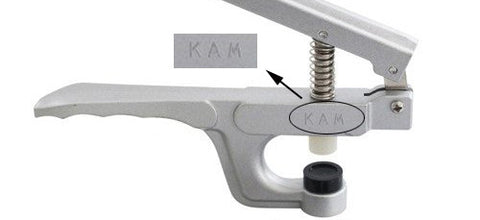
Changing the Cap (Bottom) Die:
Depending on what you have purchased, the pliers may come with a variety of cap dies. Select the die that best fits the cap you are using. The cap should be sitting completely inside the inner cup of die; if any part fo the cap is resting on the raised outer edge of the die, then that die is too small. If there is no die that sits the cap perfectly, select the next largest die. The cap die for size 16 is usually already preloaded in the pliers.

To change a cap die, simply use the screwdriver to loosen the screw under the die, insert the appropriate die, then tighten the screw. Do not overtighten the screw. Just tighten it enough to keep it secure.

Changing the Stud/Socket (Top) Metal Bolt:
Depending on what you purchased, you may have received 2 top metal bolts. If you remove the rubber caps, you will notice that the tip on the metal bolts are different sizes. The larger one has a tip approx 5mm wide. The smaller is 3mm.
You will need the larger one for size 24 snaps. The smaller one is for size 20 and smaller snaps. The smaller one is usually already preloaded in the pliers.
Using the screwdriver included, remove the top screw.

Take off the metal spring.
Pull off the rubber cap and remove the metal bolt.
Replace with the other metal bolt (the smaller one for size 20 snaps and smaller), and put all the pieces back together.
You will need to squeeze the pliers a little to give complete clearance through the little hole for the top screw to go back through. Do not overtighten the screw. Just tighten it enough to keep it secure.
Using the Pliers:
Please practice on sample fabric first to get the hang of it before applying snaps to your actual project. Removing plastic snaps is very time-consuming!
To begin snapping, first use the awl to poke a hole through your fabric where you want the snap to be.

Place the prong of your cap through the hole.
Place the stud or socket over the cap prong.
Hold your snap in place and firmly squeeze the pliers closed. If the cap you are using does not perfectly fit the cap die, you'll need to try to center the cap in the die as best as you can. The more centered your snap is between the dies, the better the results.
The prong should be smashed down flat.

Troubleshooting & Fine-Tuning
If your snaps are falling off your fabric, you are either not using enough pressure to squeeze the pliers or your fabric is too thick for the length of the particular snap size you are using. To determine if this is the case, try attaching snaps to some scrap fabric of a thinner material (like 4-6 layers of a t-shirt material). If the snaps work on the thinner material, then you know your problem was a result of your fabric being too thick. If this is the case, consider using snaps with longer prongs.
If your snaps are securely fastened to your fabric but do not close with a loud "click," then something is wrong. We have a video here which illustrates this problem, which we recommend you watch in addition to reading the rest of this section. If insufficient pressure is applied against the sharp cap prong, the prong will not flatten properly. That means they will stick up too much and get in the way when you try to close your snaps. In the image below, the center "ball" created by the prong on the right is high and narrow--you want it flat and wide, as shown on the left.

The following are reasons why the cap prong may not have smushed down flat enough:
1) Not enough pressure was used when you squeezed the pliers. Make sure you are squeezing the pliers hard enough, as well as using the correct top metal bolt and bottom cap die. If you are still having a problem, or if you simply want to fine-tune your snaps, remove the upper rubber piece from the metal bolt after you have already applied your snap. Then re-press the snap so that the metal bolt connects directly against the prong, as shown in the picture below. This will allow more force against the prong and will cause it flatten more.
Do not remove the rubber piece when you are first attaching the snap to your fabric, as that will cause other problems; the rubber should be removed only when you are re-pressing.

2) Your fabric is too thin for the snap you are using. (This is the cause of most problems.) If your fabric is too thin for the particular size/length of snap you are using, then the prong will not flatten enough no matter how hard you press. If they don't flatten enough, then they will stick out and get in the way when you try to close your snap. As a result, the socket and stud will not snap together properly.
To test if this is the cause of your problem, take some scrap fabric and fold it at least 2-3 times so that it is at least twice or triple as thick as the fabric combination you were originally using with the problem snaps. (6 layers of t-shirt material to give you an idea of what would be sufficient).
Then attach a socket and stud to this thicker fabric. If the snaps close ok, then you know your original problem was due to the fabric being too thin. In that case, you can do 1 of 2 things to correct the problem:
a) Use caps with shorter prongs. You can either purchase shorter caps, or just snip off the tip of the caps you currently have.
b) Add more layers to your fabric, such as interlacing or fleece, to thicken it up.
3) Sometimes your snaps will work until you machine wash and dry and then suddenly, they won't snap close anymore. The reason for this is the extreme heat of the dryer causes the plastic to expand ever so slightly. If your snaps were attached securely, this won't make a difference. But if they were on the verge between secure and unsecure, then the tiny bit of expansion caused by the dryer heat will result in your smushed prongs sticking out too much so that they now get in the way when you try to close your snaps. To fix this, go back to step #1 above and re-press without the rubber tip.
If you continue to have the same problem after trying these solutions, please send an email describing your problem as specifically as possible to sales@kamsnaps.com. It would also be very helpful if you could include a close-up picture of the socket and stud attached to your fabric. Remember, we can't see what you are seeing so we rely solely on the information you share with us.
Removing Snaps
It is much easier to attach a snap than to remove it. But if you have made a mistake with your plastic snap, you can try to remove it in a number of ways:
- Apply a small amount of heat to the cap prong at the center of the snap which holds the snap together. The heat will melt the prong, which will allow you to simply pull the 2 pieces of the snap apart. You can use a soldering tool if you have one (eBay has inexpensive “soldering pencils”), or just heat up the tip of a fork tine over a flame and quickly place it against the prong to melt it.
- Small pliers, wire cutters, or nail clippers can also be used to chip away at the sides of the snap or the snap prong until the snap breaks.
- Use a leather hole punch tool to punch a hole around the smushed prong. This will create a larger center hole in the attached socket or stud, which will allow you to simply pull the 2 sides of the snap apart.
- Use a dremel/drill with a small rounded tip against the prong until the snap can be removed.
- Place your fabric upside down under the press (cap side up) or sideways. Press down as if you were applying a snap, and it should fall off. We have a video showing how to do this with both the snap press and the pliers here.
Whichever method you try, be sure to go slowly so that you don't damage your fabric.
We recommend watching the videos in this order.
- Attaching size 20 snaps (for "HG" pliers)
- Attaching size 20 & star snaps (for "GF" pliers - discontinued)
- Attaching size 16 snaps
- Attaching size 24 snaps
- Troubleshooting problem snaps
- Removing plastic snaps